Showing posts with label #softwaretesting. Show all posts

Saturday, June 20, 2026

How SDETs Can Use AI Agents, MCP & LLMs in Daily Work: A Practical Guide

 The software testing industry is undergoing a massive transformation. Just a few years ago, automation engineers focused on writing Selenium scripts, creating frameworks, and maintaining test suites. Today, a new wave of technologies—LLMs (Large Language Models), AI Agents, and MCP (Model Context Protocol)—is changing how quality engineering works.

Many engineers hear these terms daily but struggle to understand how they fit into real-world testing activities.

This article breaks down these concepts using simple examples and shows how SDETs can leverage them to become more productive, strategic, and future-ready.


The Evolution of Software Testing

Traditionally, SDETs spend significant time on activities such as:

  • Understanding requirements
  • Writing test cases
  • Creating automation scripts
  • Executing regression tests
  • Investigating failures
  • Logging defects
  • Preparing reports

While automation reduced manual testing effort, engineers still spend hours performing repetitive tasks.

This is where AI comes into the picture.

Imagine if an intelligent assistant could:

  • Read requirements
  • Generate test scenarios
  • Write Playwright scripts
  • Execute tests
  • Analyze failures
  • Create Jira defects
  • Send execution summaries

That's exactly what happens when AI Agents, LLMs, and MCP work together.

Understanding LLMs: The Brain

A Large Language Model (LLM) is the intelligence layer.

Examples include:

  • ChatGPT
  • Claude
  • Gemini
  • Llama

Think of an LLM as a highly knowledgeable engineer.

You can ask:

Generate test cases for a login feature.

The LLM can produce:

  • Positive scenarios
  • Negative scenarios
  • Boundary validations
  • Security checks

However, there is a limitation.

The LLM can think and generate answers, but it cannot directly interact with your systems.

It cannot:

  • Open Jira
  • Read Confluence pages
  • Execute Playwright scripts
  • Create defects

For that, we need AI Agents.

Understanding AI Agents: The Worker

An AI Agent is an LLM combined with:

  • Memory
  • Planning
  • Tool access
  • Decision-making capabilities

Instead of simply answering questions, it performs actions.

Think of it as:

LLM + Tools + Reasoning + Actions = AI Agent

For example:

You ask:

Create automation tests for the login page.

An AI Agent can:

  1. Read requirements.
  2. Generate test cases.
  3. Create Playwright code.
  4. Execute the tests.
  5. Analyze failures.
  6. Create bug reports.

The difference is simple:

LLMAI Agent
Thinks      Thinks + Acts
Answers Questions      Completes Tasks
Generates Content      Executes Workflows

Understanding MCP: The Universal Connector

Now imagine your agent needs access to:

  • Jira
  • GitHub
  • Confluence
  • Databases
  • APIs
  • Test Environments

Traditionally, every integration requires custom development.

This creates complexity.

MCP solves this problem.

What is MCP?

MCP (Model Context Protocol) is an open standard that enables AI systems to communicate with external tools and data sources.

Think of MCP as:

USB-C for AI

Just as one cable can connect multiple devices, MCP allows AI Agents to connect to multiple systems through a common interface.

Instead of building hundreds of custom integrations, agents can use MCP-compatible connectors.

How the Three Technologies Work Together

A simple flow looks like this:

 SDET
↓
LLM
↓
AI Agent
↓
MCP
↓
Jira / GitHub / APIs / Databases

The LLM provides intelligence.

The Agent decides what to do.

MCP provides access to tools.

Together they create intelligent automation systems. 

Real-Time Use Cases for SDETs

1. Automatic Test Case Generation

One of the most time-consuming tasks is creating test cases from requirements.

Traditional Approach

  • Read user story
  • Understand functionality
  • Create scenarios manually

AI-Powered Approach

Agent reads:

  • Jira Story
  • Acceptance Criteria
  • Confluence Documentation

Then automatically generates:

  • Functional Tests
  • Negative Tests
  • Edge Cases
  • Security Scenarios

Result:

  • Faster analysis
  • Better coverage
  • Reduced manual effort

2. Automation Script Generation

Modern LLMs can generate Playwright scripts with impressive accuracy.

Example prompt:

Create Playwright tests for login functionality using valid and invalid credentials.

The agent can generate:

  • Page Objects
  • Test Data
  • Assertions
  • Reporting Logic

The SDET simply reviews and refines.

This accelerates automation development significantly.

3. Smart Test Execution

Agents can determine:

  • Which tests should run
  • Which tests can be skipped
  • Which modules are impacted

Instead of running a 5-hour regression suite, the agent executes only relevant tests.

Benefits:

  • Faster feedback
  • Reduced execution costs
  • Quicker releases

4. Defect Management

Failure analysis often consumes more time than test execution.

AI Agents can:

  • Capture screenshots
  • Collect logs
  • Analyze stack traces
  • Compare previous executions
  • Create Jira defects

Example defect summary:

Login API returning HTTP 500 when password contains special characters.

The bug report is generated automatically with evidence attached.

5. Test Impact Analysis

One of the most exciting use cases.

Suppose a developer modifies:

User Authentication Service

The AI Agent can:

  • Analyze code changes
  • Identify impacted APIs
  • Identify impacted UI flows
  • Suggest test suites to run

This saves enormous execution time.

A Day in the Life of an AI-Powered SDET

Imagine this scenario.

A new story is added to Jira.

Step 1

Agent reads the story using MCP.

Step 2

Agent retrieves related documentation from Confluence.

Step 3

Agent generates:

  • Test cases
  • API tests
  • Playwright scripts

Step 4

Agent executes tests in the test environment.

Step 5

Failures are analyzed automatically.

Step 6

Defects are created in Jira.

Step 7

Summary is posted to Slack or Teams.

Step 8

SDET reviews results and approves.

What previously required hours can now be completed in minutes.

Building Your Own AI Test Architect

For SDETs looking to future-proof their careers, an AI Test Architect project is an excellent portfolio showcase.

Suggested features:

Requirement Analysis

Upload requirement documents and generate test scenarios.

Test Case Generator

Generate comprehensive manual test cases.

Playwright Script Generator

Create UI automation scripts.

API Test Generator

Generate REST API test suites.

Flaky Test Detection

Identify unstable automation tests.

Performance Scenario Generator

Generate load testing scenarios automatically.

Test Impact Analysis

Predict impacted tests after code changes.

MCP Integration

Connect to:

  • Jira
  • GitHub
  • Confluence
  • Databases 

Final Thoughts

The easiest way to remember these concepts is:

🧠 LLM = Thinks

🤖 AI Agent = Acts

🔌 MCP = Connects

🚀 SDET = Achieves More

The future of quality engineering isn't just automation—it's intelligent automation powered by AI Agents working seamlessly across the software development lifecycle.

As SDETs, now is the perfect time to start experimenting, building, and learning. The next generation of testing tools will be agent-driven, and the engineers who master them early will have a significant advantage.

Software Engineering Cafe ☕
Simplifying Software Engineering, Testing, AI, and Automation—One Cup at a Time.


Thursday, September 11, 2025

Where Can We Apply AI in Software Testing?

Artificial Intelligence is no longer a futuristic concept in software testing – it’s here and actively transforming how QA teams work. From reducing test maintenance to predicting failures before they happen, AI-powered testing tools are becoming essential in modern DevOps pipelines.

Here’s a breakdown of where AI can be applied in testing, along with real-world tools that support each area.

  1. Test Case Generation

AI analyses requirements, user journeys, and code changes to generate meaningful test cases automatically.

Tools

Testim – uses AI to create automated tests from user flows.

Functionize – converts plain English requirements into test cases.

Benefit: Saves manual effort and increases coverage.

2. Test Case Optimization & Prioritization

AI helps identify the most relevant test cases based on impact analysis.

Tools

Launchable – uses ML to prioritize test runs.

Sealights – focuses on smart test selection.

Benefit: Faster execution without compromising coverage.

3. Defect Prediction

AI predicts high-risk areas in the application by analyzing code commits, bug history, and patterns.

Tools

DeepCode (Snyk Code)– detects potential defects through AI-driven code analysis.

CodeScene– predicts hotspots based on developer activity.

Benefit: Proactive defect detection before failures occur.

4. Automated Visual Testing

AI detects pixel-level differences and layout issues across browsers/devices.

Tools

Applitools Eyes– AI-powered visual validation.

Percy (by BrowserStack) – automated visual regression testing.

Benefit: Guarantees UI consistency.

5. Self-Healing Test Scripts

AI adapts scripts when UI changes break element locators.

Tools

Testim – heals broken selectors automatically.

Mabl– self-healing test execution.

Benefit: Reduces flaky tests and script maintenance.

6. Intelligent Test Data Generation

AI creates realistic, diverse, and compliant datasets.

Tools

Tonic.ai – synthetic test data generation.

GenRocket – generates controlled test data at scale.

Benefit: Better test reliability and compliance.

7. Performance Testing & Monitoring

AI identifies performance anomalies and predicts failures under load.

Tools

Dynatrace– AI-driven performance monitoring.

AppDynamics – anomaly detection for applications.

Benefit: Faster root cause detection and performance tuning.

8. Regression Testing

AI determines which regression tests are necessary after code changes.

Tools

Testim and Mabl– smart regression test automation.

Launchable– regression suite optimization.

Benefit: Faster CI/CD pipelines.

9. Security Testing

AI detects vulnerabilities and predicts attack vectors.

Tools

Snyk– AI-powered security scans.

Darktrace – anomaly detection for security threats.

Benefit: Strengthens application security early.

10. User Behavior Analytics for Testing

AI uses production data to simulate real-world usage patterns.

Tools

Mabl – integrates customer journeys into test coverage.

ProdPerfect – generates tests based on real user behavior.

Benefit: Testing aligns with actual user needs.

✅ Final Thoughts:

AI isn’t here to replace testers – it’s here to enhance testing efficiency and accuracy. By adopting AI-powered testing tools, teams can:

Automate repetitive tasks.

Predict and prevent defects earlier.

Release faster with higher confidence.

The future of software testing is AI-augmented, and the sooner teams start experimenting with these tools, the more competitive they’ll be.

Sunday, October 15, 2023

Different Types of Tests that can be automated🤷‍♂️

Automation can be applied to various types of tests across software development Life cycle, ensuring efficiency, accuracy, and speed in the testing process.


Here are different types of tests that can be automated:

Functional Tests

Functional tests validate the software’s functionality by testing it against the specified requirements. These tests check if the application behaves as expected from the end user’s perspective. Automated functional tests can simulate user interactions and validate various use cases.

Example:

Testing the login functionality of an application with valid credentials.

Unit Tests

Unit test usually tests the individual Object or individual methods of an object in a class. Unit Testing is highly necessary to prevent the flow of defect or preventing the defect at the earliest in the SDLC.

Example:

Testing the loops or conditions in a class

Integration Tests

Integration tests verify the interactions between different components or modules of a system. Several modules are together tested. The purpose of Integration tests is to make sure that all modules integrate and work together as expected. Automated integration tests help ensure that these interactions work as expected and that integrated components function properly together.

Example:

Testing the flow of placing the order for an item in Amazon or Flipkart along with payment.

System Tests

System Testing is a complete fully integrated product Testing. It is an end-to-end testing where the testing environment is similar to the production environment. Here, we navigate through all the features of the software and test if the end business / end feature works. We just test the end feature and don’t check for data flow or do functional testing and all.

Example:

Testing the end to end flow from login to placing and order and rechecking the order in My Orders page and logout in Amazon or Flipkart

Automating these tests can significantly improve the development workflow, allowing for faster feedback, early bug detection, and overall higher software quality. It’s important to strike a balance between automated and manual testing to ensure comprehensive test coverage.

Happy Testing!!!


Sunday, July 2, 2023

How to Write Good Test Cases?

Writing or Creating Test Cases is one of the important activity performed by the tester in the Software Testing Life Cycle(STLC). But creating effective test cases is an important skill and which can be improved by in depth study of application.

What is test case?

A test case is a set of actions performed on a system to determine if it satisfies software requirements and functions correctly.

Test Cases should be small, isolated and atomic. They should be easy to understand and steps should be clear. Steps should be independent and clear. Each good test should have defined its expected result.

What all fields needs to be included in test case?

1. Test Case ID

Unique Test Case Identification Number

2. Module name or Requirement ID

Module name or Requirement ID mentioned in the System Requirement Document and Traceability Matrix

3. Risks & Assumptions

If any risks or assumptions known 

4. Test Data

Test data required for executing the test case.

5. Test Steps

Detailed steps for test case execution

6. Expected results

How application should behave after executing the above testing steps

7. Result

Pass or Fail

8. Comments

Some additional information for developer to reproduce the defect or some observation.

How To Write Effective Test Cases?

While writing the test cases you need to follow some steps to make sure that you will write good and effective test cases.

  1. Identify The Scope And Purpose Of Testing
  2. Define the testing activities and steps for each testing type
  3. Identify Non-Functional Requirements
  4. Define the automation Test Strategy for Regression
  5. Understand the application in depth.
Important Tips To Write Your Test Cases More Effective:
  1. Test cases should have very good test case coverage.
  2. Test Cases should have good coverage with less no. of steps.
  3. Test Case should be written by applying test case design techniques.
  4. Test Case should be simple to understand.
  5. If test cases given to any new Tester, he/ she should be able to execute the test cases without asking any questions or clarifications.
  6. Test Case should be written in test case template.
  7. Test Case should be consistent, means flow or sequence should be good.
  8. Test Case should consists of both positive and negative scenarios.
  9. Test cases should be able to catch the defects.
  10. Test cases should not be redundant, means no duplicates.
  11. Test Cases should be very easy to convert into Automation scripts.

These are the characteristics of Good Test Case.

Final Thoughts:

A test case is to be written to check if features of application are working as expected. Basically a test case contains Test Case ID, Test Steps, Expected result, Result fields. While writing test case keep in mind that all test cases should be simple and easy to understand. First you should cover the Functional test cases then you should include the non-functional test cases. Both test cases are equally important to improve the quality of application. 

Thanks for reading my article. Hope you liked it!!!

Happy Testing !!!!

Saturday, January 8, 2022

What is TestNG?

TestNG is a testing framework inspired from JUnit and NUnit but introducing some new functionality that makes it more powerful and easier to use.

It is an open-source automated testing framework. TestNG is similar to JUnit.

It is designed to be better than JUnit, especially when testing integrate classes.

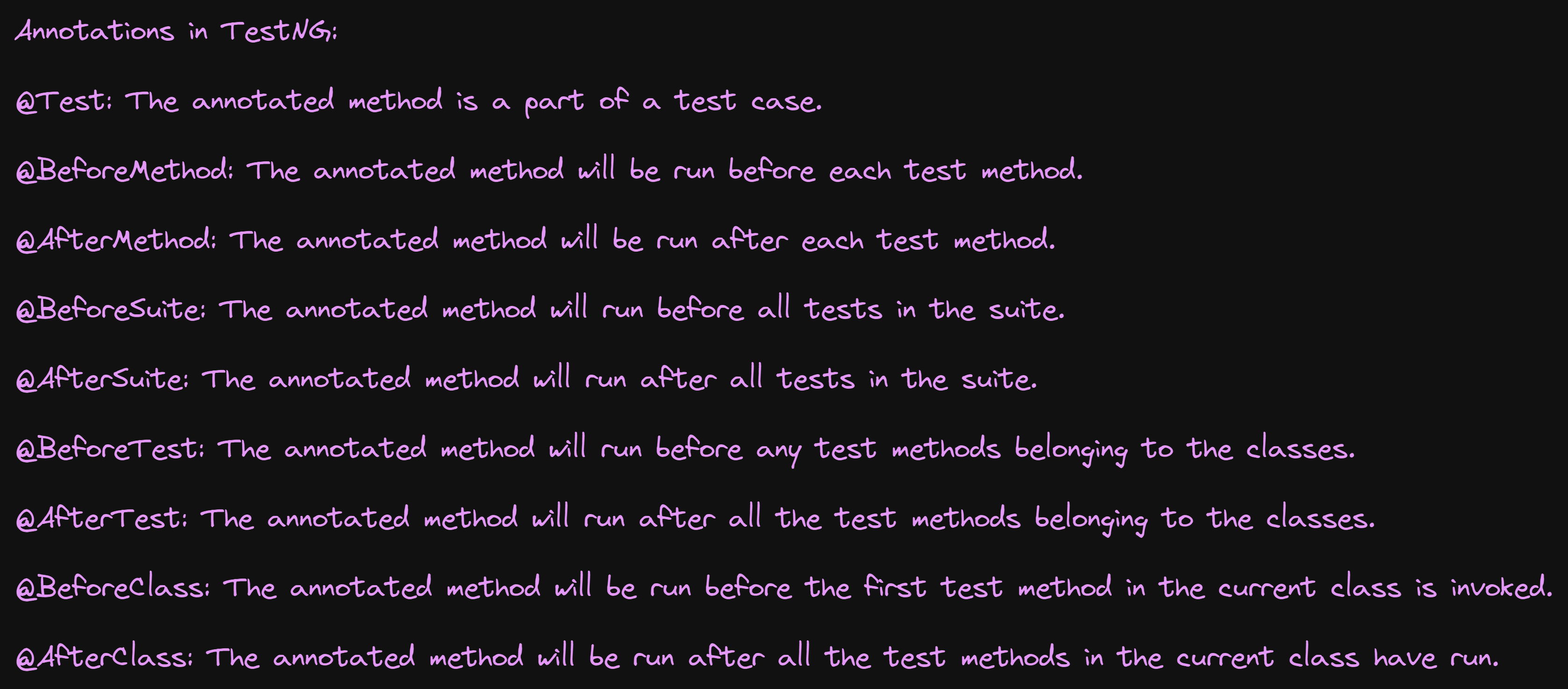
TestNG eliminates most limitations of the older framework and gives the developer the ability to write more flexible and powerful tests with help of Easy Annotations, Grouping, Sequencing, Parameterizing.

Benefits of TestNG in terms of Selenium testing are:

·        It gives the ability to produce HTML Reports of execution

·        Annotations made testers life easy

·        Test cases can be Grouped & Prioritized more easily

·        Parallel testing is possible

·        Generates Logs

·        Data Parameterization is possible


Friday, December 24, 2021

USABILITY Testing

 In this article, we will see about Usability Testing and how it will performed and significance of it.

Firstly , What exactly is Usability Testing?

Testing the user friendliness of an application is called Usability testing.

Let us start with an example such that we have two applications A & B which are different but doing the same job. In this, we see which one is user friendly.

Given below are some of the parameters we look into for testing. In this most of them are not measurable,

ü  Speed

ü  Help

ü  Navigation should be simple

ü  Compatibility

ü  Look & feel

ü  Features

ü  Location of components

One important parameter other than the above said parameters is “Effort needed to learn the application”. 

Suppose in the example, we understand the software A in 2 hrs, but we take 4hrs to understand B. Let us see different cases here,

®    since we understand A in 2hrs, it becomes user friendly compared to B

®   suppose look & feel is not good for A. In this case though, we understand A in 2hrs, we cannot say that A is user friendly.

®    Therefore, we look into many parameters before we say user friendliness of a software

 What is LOOK & FEEL?

The application should be such that it should be pleasant looking [ suppose if we have red color text in yellow background, definitely we don’t feel like using it ] and make a feel to the end-user to use it.

 Let us now see an example of Usability testing:

1) Consider some of the examples below,

In this example, we see the Inbox – the most frequently used feature is not kept in the right place.

End – users therefore search for the Inbox & after sometime, they find the Inbox lying somewhere down.

This type of application may lose the customers because they are less user – friendly.

How to overcome this,

See to it that the important features are placed in the left navigation bar and top navigation bar (This is normally followed)

Then we should see whether frequently used features are easily accessible (like Inbox, Compose Mail etc)

While testing, we therefore have to list all the important features before we start testing an application.

2) Consider the sketch shown below,

The end – user to draw the above sketch every time, he clicks Tools -> Draw -> Line for each line and finally he clicks Tools -> Draw -> Line to complete the sketch.

In this , we see the end-user wants to draw a simple sketch, but he wastes his time in clicking each time the Tools -> Draw -> Line for the sketch. This becomes a waste of time for the end-user.

Therefore, while testing , we must make user friendly of the application by creating Tool bar which makes the job simple by clicking on the necessary tools instead of going & clicking each time Tool -> Draw -> Line

How to conduct Usability testing? (OR) What process will  follow to do Usability testing?

Prepare OR derive checklist (i.e, what are the points to be checked). If we don’t prepare a checklist, we may miss some features in the application.

For Usability testing, we should prepare a genuine checklist specific to the product we develop.

 Example of a checklist for an application,

ü  For this application, one of the checklists includes color of already checked link should be changed to red

ü  All the images should have alt tag(Tooltip)

ü  All the pages should have link to Homepage

ü  Login feature should have Forgot Password link

 Like the above checklist, we can derive as many checklists as possible based on the application (or) product. While deriving checklist, we should derive a common checklist which can be executed for all pages.

Hope the article helped you to understand about Usability Testing.

Thanks for reading my Blog, 

Hope you liked it.

Happy Testing!!!!


Saturday, November 6, 2021

Characteristics of Good Test Case!!!!


  1. Test cases should have very good test case coverage.
  2. Test Cases should have good coverage with less no. of steps.
  3. Test Case should be written by applying test case design techniques.
  4. Test Case should be simple to understand.
  5. If test cases given to any new Tester, he/ she should be able to execute the test cases without asking any questions or clarifications.
  6. Test Case should be written in test case template.
  7. Test Case should be consistent, means flow or sequence should be good. 
  8. Test Case should consists of both positive and negative scenarios.
  9. Test cases should be able to catch the defects.
  10. Test cases should not be redundant, means no duplicates.
  11. Test Cases should be very easy to convert into Automation scripts.

These are the characteristics of Good Test Case.

Thanks for reading my article.

Happy Testing !!!!