Monday, October 12, 2020

Verification & Validation!

Verification & Validation...🤔

What they really means?

Verification: Verifying/Testing Customer Requirement Specification, System Requirement Specification , High Level Design, Low Level Design and also check whether it is according to the requirement or not, is called as Verification. It is done before software is developed.

Here we ensure that "Are we building product right/software right/system right".

Validation: Testing the functionality of an application by executing test cases is called as Validation. It is done once the software is developed.

Here we ensure that "Are we building right product/right software/right system".

Thanks for reading this Blog!!!!

Wednesday, October 7, 2020

Different Domain Knowledge for Testers!!!

 We have many domains like Automobile, Ecommerce, banking etc. As we testers should understand basics of domain which we work and also others. I was searching how to get that and found few links created by Inder P Singh which helped me to get overview of ecommerce, Banking, automobile industry.


Below are the links to watch:

For Banking Domain knowledge: Banking Domain Knowledge

For Automobile Domain knowledge : Automobile Domain Knowledge

For  Ecommerce Domain knowledge: Ecommerce Domain Knowledge

For Telecom Domain knowledge : Telecom Domain Knowledge

I know actual domain and application knowledge will be getting when we work and understand. Hope it helps someone who wants to know basics of different Domain knowledge as we all will not get chance to work on all.

Thanks for reading, hope you liked it.

Happy Blogging!!!!!!

Monday, September 28, 2020

Printing Alphabets in Java!

 Here is the program to print all the alphabets in Java:

public class Alphabets {

      public static void main(String[] args) {

                  for(char i='a';i<='z';i++){

System.out.print(i+",");

                   }

        }

 }

Console Output:


Thursday, September 24, 2020

Types of defects!!!!

As we all test the software in order to find defects, we also need to know types of defects.

There are many types of defects in general.

1.Functionality defects

2.Compatibility defects

3. Cosmetic defects

4. Performance defects

5. Security defects

6. Database defects

7. Wrong implementation defects

8. Missing implementation defects

9. Blocker defects

10.Major defects

11.Critical defects

12.Minor defects

These are few of the types of defects which I came across.


Happy Blogging!!!!

Sunday, September 6, 2020

Error,Defect,Bug and Failure!!!

Let us see the difference between Error, Defect,Bug and Failure.

Error: Mistakes done by developers in the code because of which we will not be able to run the code or compile the code is called as Error.
Example: System.out.println("Hello);

Defect: Error found in the application is called as Defect.

Bug: Bug is an informal name given to the defect and also defect accepted by the developers is called as Bug.

Failure: Many defect/Bugs present in the software leads to failure. If a build is not working according to the customer requirement specification leads to failure.

Happy Software Testing!!!!!

Saturday, September 5, 2020

Test Scenario & Test Case!!!!!

Test Scenario and Test Case are the most important and commonly used terms in Software Testing.

In simple terms and sentences we see both the terms as,

What is Test Scenario?

Test Scenario is a high level documentation of all the customer business work flows according to the requirement. By looking into the test scenario we can not test any project or application until and unless we have very good project/product knowledge.

Example : For Whatsapp application, Open Whatsapp, click on Chats, Open a chat, Click on Search and enter any letters, it should be highlighted.

What is Test Case?

Test Case is a detailed documentation of scenario which helps to Tester to test the application. By looking into testcases, we can test any project or any application without having product knowledge because it will be in detail.

Example: For the above scenario,

                 Step:1: Open Whatsapp

                 Step:2: Click on Chats

                 Step:3: Open a Chat

                 Step:4: Enter letter 'A'

                 Step:5: Check whether the text containing 'A' are highlighted or not.

While writing test cases, all the details will be provided like test data, expected result to compare and step by step test steps.

Thanks for reading my Blog!!!

Happy Software Testing!!

Wednesday, September 2, 2020

Software Test Life Cycle!!!!

Software Testing is an investigation conducted to provide stakeholders with information about the quality of the software. It is a process which involves the execution of a software or system to check whether the software is working as expected.

Software Testing mainly focuses whether the developed system meets the customer/stakeholder’s expectations. Software Testing itself has many phases and it is called as STLC. STLC is a part of Software Development Life Cycle. SDLC has many phases and STLC is a part of it.

Below flow diagram shows the different phases of STLC:

Requirements is the input to STLC. Software Testing starts with Requirements, firstly Requirements will be studied by entire team that is called as System Study. After the first two phases, Test Plan will be created to understand the scope of Testing. Once after Test Plan is created, detailed Test cases will be written / created. Traceability Matrix will be created to ensure each requirement is covered with the test cases. Test Execution and Defect Tracking will be done if there are any defects. Once all the test cases are executed and finished. Then Test Execution report will be created and retrospect meeting will be conducted to discuss about what went well and what didn’t go well.

We will see all the phases in detail below:

1.Requirements:

            The very first is Requirements and it is the input for Testing. It is the phase where Software Testing starts. Requirements will be discussed with the entire team.

    2. System Study:

           The requirements given in first phase will be deeply studied and process starts with writing Test Plan. 

3.Write Test Plan:

Test Plan is a document which derives all the Testing activities of the project. All the future Testing activities will be planned and document in this and it is known as Test Plan.

It contains below information usually:

   Number of Testers needed.

   Who should Test which module and which feature.

   Which will be the Defect Tracking tool.

   Start and End Dates of writing Test Cases and Execution planned dates.

   Scope of Testing

4.Write Test Cases:

    In this phase, Test Cases will be created. These Test Cases will be reviewed and after all review comments are updated and once the test cases are approved, they will be stored in a Test Case repository.

5.Traceability Matrix:

Traceability matrix is a document which ensures that every requirement has a test case. Test cases are written by referring to the requirements and test cases are executed by using them.

If any requirement is missed and test cases are not created for that particular requirement, then testing will not be done for that module /feature. To make sure that all the requirements are having at least one test case.

6.Defect Tracking:

Bug/ Defect found by QA team is sent to the development team. This should be followed up by QA team until it is fixed and if it is really fixed then need to do Retesting and also Regression Testing based on the need and defect should be closed.

7.Test Execution Report:

It is a report generated once Testing is completed. Usually it is prepared after every Test Cycle and sent to Development team, Testing team, Management team and also sometimes Customer.

The last Test Execution report will be sent to customer and this means that project is over.It contains below information usually:

        List of Bugs

        Summary of Test Cases passed and failed.

        Summary of Deferred Test Cases

8.Retrospect Meeting:

     It is also called as Post Mortem meeting or Project Closure Meeting. It is conducted to discuss the achievements and mistakes in the project. “What went well” and What didn’t go well” will be discussed and document in Quality Management System under Retrospect folder.

These are the various phases of STLC generally.

Thanks for reading my Blog.

Happy Testing!!!!


Friday, August 21, 2020

SEVERITY & PRIORITY OF A BUG😎!!!

Severity and Priority of a Bug are the mandatory fields of a Bug Report because these two fields helps to  decide how quickly a bug should be fixed.

What is Severity?

Severity is the impact of the bug on customer's business and tells how severe the bug is and the impact of the bug.

What is Priority?

Priority defines how soon the defect should be fixed.It defines the importance of the bug.

Generally, Severity is assigned by Tester/Test Lead and priority is assigned by Developer/Project Lead.It requires whole team to decide. Development team will fix the High Priority Bugs first rather than high Severity.

Examples of Different Combinations:

High Priority & Low Severity: Logo of the company or brand ,it won't cause lot of damage but need to be fixed as soon as possible.

High Priority & High Severity: In an Ecommerce website, 'Submit' button is not working.When user enters all the information and clicks on 'Submit' button , it throws error.

Low Priority & Low Severity: Spelling mistakes , a page is taking more time to load than usual.

Low Priority & High Severity: Browser compatibility issues

These are only the examples, in real time whole team will decide these two fields as per the application and business flows.

Happy Software Testing!!!!!!

Thursday, August 20, 2020

HTTP Requests....???

What are HTTP Requests...🤔


The requests that the browser sends to the Web Server are HTTP requests. In simple terms, it is a way of sending messages between two machines over the internet.
HTTP stands for Hyper Text Transfer Protocol.

Any HTTP request consists of below components:
1. Type of Request:
     It consists of whether it is GET, POST, PUT or DELETE.
2. HTTP Headers:
     Headers specify information such as type of browser, type of content in the message and what type of response we receive in return.
3. Body/Payload:
    It consists of information sent to / from the web application. 
    Only POST and PUT have payloads where as GET and DELETE cannot have payload.

Thanks for reading!!
Happy Blogging!!!!! 

Wednesday, August 19, 2020

What is Web Application???

What is Web Application?

In simple terms, Web Application is  a software application that is deployed to a web server. Users can access the application via a web server.
For example , www.facebook.com is a web application. User visits facebook.com in any of the browser and 'Login' page is displayed in the browser. GUI consists of 'Email id' and 'Password' input text fields. When user enters the valid credentials and clicks on 'Login/SignIn' button, if credentials are valid then 'Home' page is displayed.
When user clicks on 'Login' button, the browser makes a request to the web application on the web server to display home page.

Flow: WebBrowser----->sends request to web application----->Web Application---->validates credentials & processes request----->sends a web page as response  to web browser----->WebBrowser


Sunday, July 26, 2020

Getting started with Web UI testing using TestProject

CONTENTS
1.Introduction to TestProject
2.History of TestProject
3.Features of TestProject
4.What’s unique in TestProject?
5.Getting started with TestProject
6.Web UI Testing using TestProject
7.Overview of new TestProject SDK
8.Conclusion
 
Let's get started with TestProject....!!!!!!!!   
1. Introduction to TestProject
First let us learn “What is TestProject?”

TestProject is an open source end to end test automation platform for web, mobile & API testing that supports by the #1 test automation community.

It supports Windows, MAC and Linux Operating Systems.
It supports Web, Android, IOS and Webservices platforms.
In simple sentence I can say that “It is a codeless automation tool with record & playback feature and allows to schedule jobs as well.”
2.  History of TestProject
TestProject was developed in 2015.The first public version was launched in April,2018.
They have a super cool website with very easily understandable documentation and online chat all time.
You can find all the details in their website  TestProject 
3. Features of TestProject
Let us see all the features of TestProject listed in the below flow diagram.
4. What’s unique in TestProject?
The below diagram clears us what is unique in TestProject.
5. Getting started with TestProject
I know by seeing all   the cool existing features, you will be eager to get started with TestProject. It can all be done in just few simple steps:
Create a TestProject account and go through the below links:
2. Installation and Setup
6. Web UI Testing using TestProject
Step:1: Creating a Project
            Once you login to TestProject, the below web page will be displayed.
            Click on “Add a New Project” button.

Step:2: Give the Project details as shown in below web page

Step:3: Project will be created and click on the Project, you will be displayed with below web page.


Step:4: Click on ‘Create a Test’ and add a new test. You can actually add a test using three ways highlighted below.

Step:5: Select whether it is web , mobile or code.

Step:6: Add Test Details.

Step:7: Select the web application and add the details.


Step:8: Start Testing and you will be redirected to web page and you can add the steps so that it will record.

Step:9: You can add validations, you can download the manual test case which is well organized.


Step: 10 : Creating a job can be done with two ways as shown below :

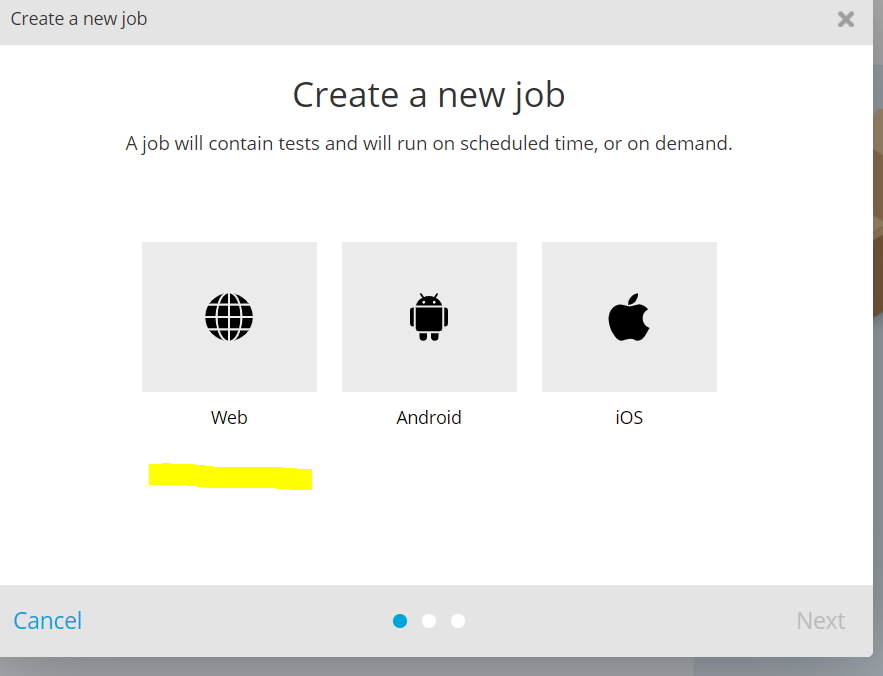
Step:11: Select whether it is Web, Android or IOS and click on ‘Next’ button.

Step: 12: Give the Job details.

Step:13: Select the agent browser.

Step:14: Once the job is created we need to add the Test to the job by drag and drop as shown below. (Drag and Drop from left to right)

Step:15: Once the tests are added to Job ,we can schedule or run.

Step:16: Click on ‘Run’ option and reports will be generated under ‘Reports’ tab.
Click on Reports tab and you will displayed with detailed report as shown below.

These are the simple steps to get started with TestProject for Web UI Testing.
TestProject has many more features to explore and excited to use as well. It is a very good platform to learn, explore and share. We can even get Java code by running the automation test.

7.Overview of new TestProject SDK
   TestProject has announced new SDK on July 14th,2020 with lots of additional cool features.
   The main highlight is “It supports a powerful language “Python” and lot more additional features.
   Let us have a look at them.

8.Conclusion

Even I have excited to learn more about this new SDK in detail. I hope the above flow diagram gives an overview of new TestProject SDK at a high-level.
Hope my blog helps to get you started with Web UI Testing with simple test and get to know about the cool features of new SDK as well.
Thanks for reading my longest Blog...!!!!


Sunday, July 12, 2020

Mathematics in Software Testing!!!!

Role of Mathematics in Software Testing.....🔢🎲🧮!!!!!


                As we all know that Mathematics plays very important role in our day to day life. Even in Software Testing also Mathematics plays a key role actually. To understand the role of Mathematics in Software Testing, it is very important to understand “What is Software Testing?”.

In Broader terms,

Software Testing = Verification + Validation

Verification = Ensure system meets the specification and has been built as per that specification.

Validation = Ensure system meets the overall purpose of the end user.

Mostly Software Testers end up in testing Web, APIs, front end and backend applications and combinations also….

Software Testing does not relate directly to Mathematics, but we use Mathematics in Software Testing. It does not required to know Mathematics at pro level but indirectly we use Basic Mathematics.

We use Basic Mathematics concepts like Arithmetic operations, Simple Interest, Compound Interest, Percentage, Excel Operations, Probability, Algebra etc.

Let us take an example of simple E-commerce application,

When user orders an item and clicks on “Buy Now” button, assume user has some amount in Wallet & user wants to use that Wallet amount to purchase.

Let us assume total cost of the item is X, user has Y amount in his wallet and rest of the amount user wants to pay using net banking.

To test this , we need to prepare test data, to prepare we need Mathematics skills.

X-Y=Z
where X is total cost of the item, Y is Wallet amount and Z is the amount that needs to be deducted through Net Banking. To test this scenario, we need to prepare test Data using Mathematical skills like Addition, Subtraction.

To this even developer need Mathematical skills, it means Software Engineering needs Mathematical skills not only Software Testers.

Let us take another example of Bank Application,

Assume X person has taken a loan of amount Y with interest having 10.5 % per annum for a tenure of 4 years. He will repay the amount in monthly EMIs and he will track it in Bank application.
 Here to test this scenario, we need to prepare test data to verify and validate. For that we need Mathematical skills like Simple Interest, Compound Interest, percentage.

Even though Mathematics is not required but basics of Mathematics is a must for Software Testing I can say. Mathematics is a one of many fields actually. Software Testers need mathematical & logical thinking skills. Software Testing requires very basic mathematical skills & logical skills, particularly proof based mathematics.

Most of the Software Engineering concepts do not directly use mathematics, they certainly use it.

Here are some of the mathematical skills which is very basic & used by the Software Testers:
  • Checking totals and arithmetic operations--- For calculating tax etc.
  • Percentage calculations---when testing promotional sales and discount operations.
  • Calculating averages and Standard deviations---for salary and few operations like rating related operations.
  • Calculating conversions ---hours/minutes/seconds to decimal time
  • Currency conversions--- Rupee to Dollar...etc.
  • Calculating Simple Interest, Compound Interest for Bank related operations.
  • Algebra ---for Cyclomatic complexity and Robustness testing. 
Below are few of the Basic Mathematical formulae used by testers:

1. Average formula:
    Let a1,a2,a3,...........so on till n be a set of numbers, average=(a1+ a2+ a3+......n)/n
    Percentage to fraction: x%=x/100
    Percentage formula: Rate/100=Percentage/base
    Rate: The percent
    Base: The amount you are taking the percentage of.
    Percentage: The answer obtained by multiplying the base by the rate.

2. Percentage: 
    Discount rate=discount%MRP Price
    Sales Tax=Price of item*Tax rate
    Interest=Principal*rate of interest*time

3. Consumer Mathematical formulas:
    These are used in Ecommerce applications mostly
    Discount =MRP Price* discount rate
    Price after Discount=MRP Price-Discount

4. Cyclomatic Complexity=L-N+2*P
     where L=No of Edges in flow graph
     where N=No of nodes in flow graph
     where P=No of Nodes that have exit point

5.   Conversion of time:
    1.  Converting hours to minutes: Minutes=Hours*60
    2. Converting minutes to hours: Hours=Minutes/60

6.  Simple Interest:
Simple Interest= P*T*R/100 
Amount = P(1+R/100)T
Where P=Principal
             T=Time (in years)
             R=Rate of Interest

This is the very brief article but it should be enough to give an basic idea of where mathematical skills are used in the Overall Software Testing.

      As Paul Halmos said “The only way to learn maths is to do maths”, in the same way we can say that “The only way to learn Software Testing is by testing the Software”.

I hope you liked my article …!!!
Happy Software Testing…!!!!

Thanks for reading my article.


Wednesday, July 1, 2020

What is Desktop Application Testing?

As we all know that we have various types of applications ,Desktop application is also one and obviously we need testing for that as well.

First we will see, What is Desktop application or Standalone application?


In simple sentence, an application that can be installed on a single computer(Laptop or Desktop) & used by only one person is called Desktop application/Standalone application testing.

Example: Adobe Photoshop, MS Office, Calculator.....etc

For Desktop applications, there is no requirement of servers & entire application is installed on the end user's machine.It is just a program that runs independently on a Desktop Operating System.
In Desktop application Testing, installation and uninstallation is also very important.

Some common types of Desktop application testing includes:
1.Graphical User Interface testing.
2.Load Testing.
3.Functionality Testing.
4.Database Testing.
5.Performance Testing.
6.Compatibility Testing.

Common defects in Desktop applications may include:
1.Installation and Uninstallation process.
2. Behaviour of System before and after installation of application.
3.Warning messages.
4.Error in Icon of application.
5.Success messages.
6.OS Compatibility.
7.Check for various tabs and links.
8.Resolution of the screen.
9.Print Compatibility.
10.Theme compatibility.
11.Cache update
12.Load testing.
13.Testing with multiple accounts (if there are multiple users)
14.Check for continuous usage of the application.
15.Check for navigations from page to page.
16.Time taken by the application to load.
17.If the application is having logs at the back end ,need to check the logs as well.

These are the common defects which came to my mind while testing desktop application.

In my point of view, Desktop application testing have slight differences from Web Application Testing.

Happy Testing..!!!